On the 13th August, we upgraded your poker experience by bringing the world's most recognised and trusted poker brand, PokerStars, to Betfair.
Welcome to PokerStars on Betfair. Two experts in their game, one smarter way to play.
In this article:
What is PokerStars on Betfair and what does this mean for me?
What happens if I am based in Ireland?
What has happened to my nickname? How do I set a new one?
What is PokerStars on Betfair and what does this mean for me?
Betfair's poker experience is now powered by the technology behind the world's most recognised poker brand, PokerStars, bringing you a faster, smoother and more rewarding way to play.
You will have access to:
- More players, more action and a smoother, faster platform
- More games running around the clock
- Premium online and live global poker events
- Major tournaments
- All-In poker leaderboards
- A brand-new loyalty programme, coming soon
What happens if I have a Betfair and a PokerStars account?
If you have both an active Betfair account and PokerStars account, you can continue playing on Betfair with your current Betfair account details. You will no longer be able to play using your PokerStars account.
Any PokerStars poker assets such as Tournament Money and Tournament tickets will be consolidated and converted into cash for you to withdraw. You will only be able to access the cashier section of your PokerStars account to withdraw any remaining funds.
What happened to my PokerStars UK account?
If you didn't have an active Betfair account, we transferred your PokerStars UK account to the Betfair platform. You will be invited to log in using your existing PokerStars credentials.
Any balance in your PokerStars account was transferred to Betfair on the day of the move, where it will be administered by Betfair on behalf of PokerStars. You'll need to review Betfair's Privacy Notice and accept Betfair's General Terms and Conditions before you can play PokerStars on Betfair.
What happens if I am based in Ireland?
Unfortunately, PokerStars on Betfair will not be accessible in Ireland. Our players in Ireland can open an account at pokerstars.com to play.
Will my existing PokerStars account be moved to PokerStars on Betfair if my address is not in the United Kingdom?
Your PokerStars account won't be transferred to Betfair. You'll be asked to withdraw your funds from PokerStars.UK. If you wish to continue playing on PokerStars, please open an account on www.pokerstars.com. Your PokerStars UK account will be closed.
How do I download PokerStars on Betfair on Desktop?
You can play online or download and install the PokerStars on Betfair desktop app, available for both Windows and macOS.
You can log in with your existing Betfair username and password to access your account and begin playing.
How do I download the PokerStars on Betfair mobile app?
You can install the latest version of the PokerStars on Betfair mobile app through the app store. Log in using your existing username and password to access your account and begin playing.
- You can download the app through iOS here.
- You can download the app through the Google Play Store here.
What details do I use to Log In?
If you have an active Betfair account, you can use your existing username/email address and password to access PokerStars on Betfair. If your PokerStars account is moved to Betfair, you can use your existing PokerStars account details (email address/username and password) to log into your new Betfair account.
When you log in for the first time, you'll need to manually enter your existing PokerStars username/email and password, these details won't be carried over automatically.
Please make sure you enter your username exactly as it was created. While PokerStars usernames aren't case sensitive, Betfair usernames are. This means you'll need to use the correct capitalisation when entering your username.
Alternatively you can login with the email address registered to your PokerStars account which is not case-sensitive. If you're unsure of the exact capitalisation of your username, you can recover it here.
Why can't I login with my username?
If we have transferred your account from PokerStars and you are unable to log in using your username, it's possible that your username is no longer unique and/or possibly already in use.
If this applies to you, you will need to log in using the email address registered to your PokerStars account instead of your username.
Once you've logged in using your registered email address, you can continue to access your account as normal.
Can some players have more than one username within the PokerStars Network?
Yes. As the PokerStars Network brings together players from across different brands and markets, some players may legitimately access the network using more than one username.
This is because different brands within the network operate with separate accounts, and therefore separate usernames.
Players are only permitted to use one account at any time, and cannot play a tournament from more than one account, even if they were eliminated.
Our existing game integrity and security standards continue to apply across the network, and we have robust measures in place to identify and prevent prohibited activity.
Why have I been sent a Security Code?
You may have received a Security Code by email on the 7th October 2026. This code is used for additional security checks to keep your account safe.
The email was sent from the following address: events@starsaccount.uk
If you're unable to find your Security Code, try the following:
- Check your email inbox for emails sent to you by events@starsaccount.uk
- Check your email inbox for "security code" or "Your security code for the PokerStars move to Betfair - keep it safe"
- Check your spam or junk folder
- Check any alternative email addresses you may use
- If you changed your email address after receiving the code, check your previous email account
- Search your inbox using the email address mentioned above to help locate the message
If you have already followed our login journey without success or if you're unable to locate your security code, then please use the Login Chat button on the article here.
For more information on this topic or if you have other log in queries (such as forgotten passwords and/or usernames), see our article here.
Why am I being asked to verify my account?
You may be asked to complete some verification steps when you log in to your account.
If you don't complete the requested verification, your access to your account may remain restricted, and you'll continue to see the verification screen each time you log in until the process is complete.
To find out more about verification, including the documents we accept, please see our verification article here.
What has happened to my 2FA, do I need to set this?
When you log in for the first time, we recommend setting up two-factor authentication (2FA) to help keep your account secure. If we have moved your PokerStars account to Betfair, your previous two-factor authentication settings won't be transferred, so you'll need to set it up again.
You can enable two-factor authentication in your Account Security settings by following the on-screen instructions.
Please note: to enable 2FA you will need to be on a desktop (computer) and not a mobile device.
To find out more about Two-factor authentication, see our article here.
Why am I being asked to log in twice on the app?
If you're using the app on either iOS or android, you may be asked to log in again after accepting the terms shown during your first login.
This is expected, and once you log in again, you'll be able to use the app as normal.
Will my PokerStars funds transfer to my Betfair account?
Yes, if we have transferred your PokerStars account to the Betfair platform, any balance in your PokerStars account was transferred to Betfair on the day of the move, where it will be administered by Betfair on behalf of PokerStars. You'll need to review Betfair's Privacy Notice and accept Betfair's General Terms and Conditions before you can play PokerStars on Betfair.
If you choose not to accept Betfair's General Terms and Conditions, you'll still be able to withdraw any remaining PokerStars balance by contacting Customer Service. Players who have an active Betfair account, are required to withdraw their funds from their PokerStars accounts.
What is the deadline for withdrawing funds from my PokerStars account balance?
If you already have an active Betfair account, you should withdraw funds from your PokerStars account. The cashier section of your PokerStars account will remain available until November 4th, 2026. After this, your PokerStars.uk account will be closed and any remaining funds can only be withdrawn by contacting PokerStars Customer Support.
Will any payment methods be temporarily unavailable?
To ensure a smooth transfer process, all payment methods will be temporarily unavailable for up to 3 hours prior to PokerStars accounts moving to Betfair.
If your account has been transferred to a Betfair account, only the payment methods available on Betfair will be accessible. These will be outlined in the accounts section when players make a deposit into their Betfair account.
What happens if I have a pending deposit in my PokerStars account when it transfers to a Betfair account?
The option to make a deposit into your PokerStars account will be switched off 3 hours prior to the transfer. This will allow all pending deposits to be cleared before accounts are moved to Betfair. Your funds will be safely transferred to your Betfair account and available as soon as you log in. Once the transfer is complete, you will be able to deposit into your Betfair account.
What happens with the Foreign Exchange Conversion?
Currency conversion will happen automatically whenever you buy into or cash out of any PokerStars poker tables. You won't be able to choose when currency conversion takes place.
You may notice small differences in your balance due to repeated conversions and rounding, these differences are typically the equivalent of a few pence.
When you buy into or cash out of a poker table, you'll see a Currency Exchange rate message within the product, this will show the exchange rate being applied and ask you to confirm the currency conversion before continuing.
Exchange rates are updated throughout each day and no margin is added to the mid-market exchange rate.
What payment methods are accepted?
You may notice that some payment methods that were previously available on PokerStars may not be available on Betfair. If you don't see a payment method you previously used, this means it isn't currently supported on Betfair.
See the below information for what payment methods are accepted:
Debit Cards & Apple Pay
You can add up to three debit cards on to your account. This rule does not apply to Apple Pay. If you have used up your maximum slots and wish to add another card, you can read our article here on how to remove a card.
If you had more than three cards on your PokerStars account, only the last three active cards used will be transferred to your Betfair account.
Pay by Bank
Pay by Bank is a payment method for both depositing and withdrawing. To withdraw via Pay by Bank, you must have deposited using this payment method first. If you haven't deposited with Pay by Bank, it won't be available when you try to make a withdrawal. This also applies to PokerStars customers who may have previously used Pay by Bank before moving to Betfair. For more information on Pay by Bank, read our article here.
Other Payment Methods
Only payment methods available in your country will be added to the 'Other Methods' tab.
- Paypal
- Skrill
- Neteller
- Rapid Transfer
- Much Better
- Bank Transfer
Please note: if you have used one of these payment methods previously on your PokerStars account, you will need to set this up again on your Betfair account.
Any payment method added to your account must be in your own name. Payment method sharing is not accepted, to find out more on this see our article here.
To find out more about what payment methods we accept, please see our article here.
Why do I see a card on my account that I don't recognise or remember saving?
Cards that have previously been used on your PokerStars account may appear on your Betfair account, even if you did not choose to save them. These card details have been transferred for legal and regulatory reasons, including closed-loop requirements. This means a card may appear on your account, even if you did not previously choose to save it.
How do I navigate the payments screen and why is the currency set to GBP?
You will have access to the Betfair Cashier instead of the PokerStars Cashier to manage your deposits, withdrawals and payment methods. If you are new to Betfair, the Betfair Cashier has a different layout, navigation and wallet experience to the PokerStars Cashier, so it may look unfamiliar at first.
It's important to note, that GBP will be the default currency for your Betfair account.
When you make your first deposit, you may notice that your deposit limit is displayed in the new account currency. This may look different from what you're used to, but your account limits and settings will continue to apply.
To find out what payment methods we accept, please see our article here. To find out more about deposit limits, see our article here.
Where can I use the funds in my account?
You have one wallet that can be used across all Betfair products.
If you need more details, including what payment methods we accept, see our article here.
Can I transfer funds to another player?
The Transfer to Player (P2P) feature previously available on PokerStars won't be available for PokerStars on Betfair. If you have used this feature on PokerStars, you will no longer be able to transfer funds directly to another player when playing PokerStars on Betfair.
Why aren't my deposit methods loading in the Betfair Poker app on Android?
We're aware of a technical issue affecting the loading of Alternative Payment Methods (APMs) on the PokerStars on Betfair app for Android devices.
In the meantime, you can still use APMs on desktop, web and iOS devices. If you're using an Android device and would like to deposit using an alternative payment method, you can do this by visiting the deposit page on the Betfair website.
What has happened with my Transaction history and where do I find it?
You will be able to view the last 3 months of your PokerStars transaction history within the transaction report. To do this, navigate using the screen below and select dates from the last 3 months which you would like to view.
Desktop:

Mobile:
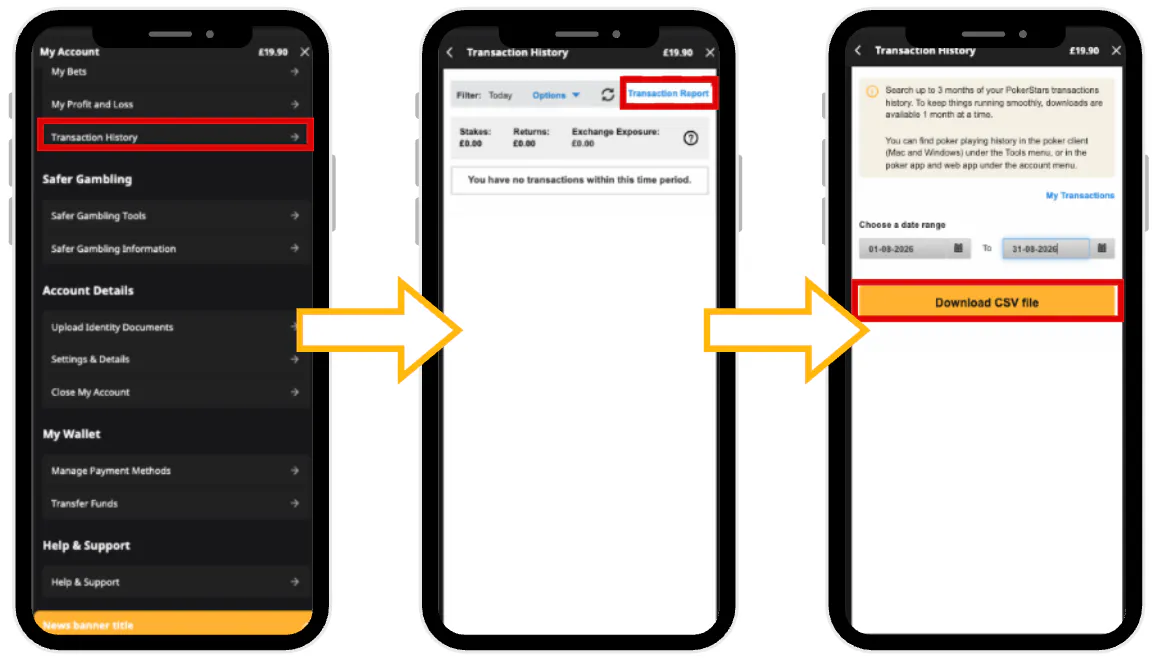
To keep things running smoothly, downloads are available 1 month at the time.
What promotions do PokerStars on Betfair have?
PokerStars on Betfair will have premium online and live global poker events, major tournaments and All-In poker leaderboards. If you're used to playing on PokerStars, your new experience will feel very familiar on Betfair.
Where do I find my available promotions?
To find promotions that you are eligible for, visit your Challenges Hub or your Poker promotions or your Promotions Hubs for your Casino and Sports promotions. To opt in to a promotion, click into the relevant promotion and follow the steps on screen.
We also share exiting promotions through marketing channels such as email. To opt into these, you can update your marketing preferences in the My Details section of your account.
How does the new Loyalty Programme work?
Stack+ is our new Loyalty Programme where you can earn Rakeback, redeemed as cash. Collect Stack+ points every time you play, building your points stack to unlock higher benefits. To find out more, visit our Stack+ page.
What has happened to my nickname? How do I set a new one?
You may be prompted to make a new nickname before you can begin playing on PokerStars on Betfair. Make sure you're happy with the one you choose because you won't be able to change it.
What will happen to my PokerStars tournament tickets and Tournament Money when PokerStars accounts move to Betfair?
If your PokerStars account moves to Betfair, you will be unregistered from all PokerStars tournaments taking place after the move and your buy-in will be refunded. PokerStars will convert all your remaining Tournament Money and Tickets into cash and will make this available in your PokerStars cashier for you to withdraw from your PokerStars account.
What will happen to my open bets I placed on my PokerStars account?
Any open bets placed on PokerStars before accounts are moved to Betfair will be void.
I can't find my favourite games, where are they?
Some of your favourite casino games from PokerStars may not be available on Betfair. However, Betfair offers a wide selection of new and exclusive games and experiences you can explore once you've accessed your account.
How do I favourite a Casino game?
Once you are logged into your Betfair account, you can favourite any Casino game by clicking the heart icon on the game tile. You can find your favourite games in the 'Favourites' tab at the top of the Casino homepage. You can remove a game from your favourites at any time by selecting the icon again.
Why does it take longer for my games to load?
You may notice that casino games take slightly longer to load compared to the original PokerStars app, this is expected. The Betfair Casino team continues to make ongoing improvements to enhance the overall performance and loading experience.
Will my recently played games transfer from PokerStars?
Unfortunately, your Recently Played history won't transfer as part of the transfer of your account.
However, you can use the ''Favourites'' feature and will find a ''Play It Again'' category on your homepage, to quickly rebuild your preferred games list and access your favourite Casino games more easily on Betfair Casino.
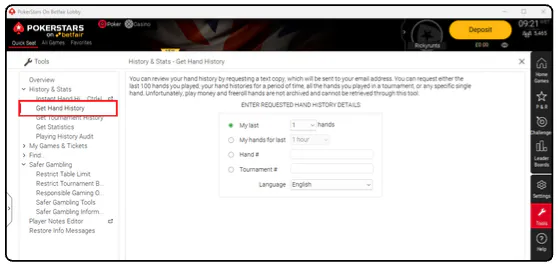
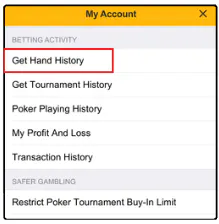
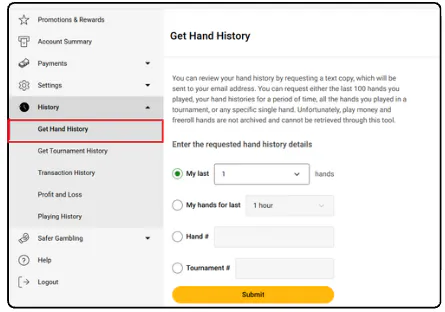
How do I find my poker playing history (hands, tournaments etc.)?
In the tools menu (Mac and Windows)
In your account menu (Poker app)
In your account menu (Poker web app)
How do I navigate the menus?
If you are new to Betfair, you may notice that the account menu structure has changed.
The new Betfair layout provides a different way to access your account management and Safer Gambling settings. While it may look unfamiliar at first, the updated design is intended to make it easier and more intuitive to find the options you need.
Why do I see "Something went wrong" when I try to log in to the Poker app?
This message usually appears when there is a restriction on your Poker account access.
If you see this error, please take note of the error code displayed and contact our Support team, who will be able to investigate for you.
One common cause is an invalid mobile or home phone number on your account. If this applies to you, please update your phone number in your account settings on betfair.com and try accessing Poker again.
How do I change my timezone on the Poker desktop app?
Click the time on the top right corner of the home screen or Go to Settings > Global > Time Zone
How do I change my timezone for sports betting?
Your timezone determines what time sports events are displayed to you on Betfair. Your timezone on Betfair will automatically set to UK time. If you're not in the UK, or just want to update it:
On desktop:
- Go to 'My Account'
- Select 'Account Details'
- Select 'My Details'
- Choose your timezone
On mobile:
- Go to 'My Account'
- Select 'Settings & Details'
- Select 'Personal'
- Choose your timezone
Once set, sports event times will display according to your selected timezone.
What if I am self-excluded, have a Gaming Exclusion, or am on time-out at the time of the move to PokerStars on Betfair?
Any applicable self-exclusion, Gaming Exclusion, or time-out restriction will remain in place following the migration of your PokerStars account to Betfair.
As Poker is classed as a gaming product on the Betfair platform, a Gaming Exclusion on your Betfair account will also prevent you from accessing Poker following the migration.
- If your Gaming Exclusion is permanent, this restriction cannot be removed, overridden, or bypassed to restore access to Poker.
- If your Gaming Exclusion is active for a fixed period, you will not be able to access Poker while the restriction remains in place. Once the exclusion period has ended, access will be subject to the return to gambling eligibility process.
To find out more about Product Exclusions, see our Help Article here.
What Safer Gambling tools are available?
Betfair offer a variety of Safer Gambling tools, information about the tools we offer can be found here.
If you would like to find out more about Safer Gambling on Betfair, see our Safer Gambling Category here.
What is the Stake Limits tool?
Stake limits are available on poker for all customers. They allow you to set how much you want to stake in each cash game or the maximum amount you can spend on a tournament buy-in.
Setting a stake limit can help you manage how much you spend on poker and stay in control of your play.
What is happening with the No Do Not Play Tool?
The No Do Not Play Tool will no longer be available to customers coming from PokerStars. Instead, Betfair offers Product Self-Exclusion, which allows you to self-exclude from all gaming products, including poker, casino and virtual sports.
This gives you the option to exclude yourself from all gaming activity on Betfair in one place.
If you would like to find out more about Safer Gambling on Betfair, see our Safer Gambling Category here.
What are Deposit Limits and how will they affect me?
Betfair offers two types of Deposit Limit: Net Deposit Limits and Gross Deposit Limits. You can have one type of Deposit Limit active at a time.
A Deposit Limit allows you to set a maximum amount you can deposit over a chosen period, helping you manage how much money you put into your Betfair account.
- Gross Deposit Limit: This limits the total amount you can deposit during your chosen period, regardless of any withdrawals you make.
- Net Deposit Limit: This takes your withdrawals into account. It limits the difference between the amount you deposit and the amount you withdraw during your chosen period. For example, if you set a £100 weekly Net Deposit Limit and deposit £100, then withdraw £50, you could deposit a further £50 during that week.
Your Deposit Limit will continue to apply when you move from PokerStars to Betfair, subject to the applicable Betfair Deposit Limit rules.
If you would like to find out more about Safer Gambling tools on Betfair, see our Safer Gambling Category here.
What is the Loss Limit tool?
The Loss Limit tool allows you to set the maximum amount you are willing to lose over a chosen period. This can help you manage your play and stay in control of how much you are comfortable losing.
Loss Limits are available across Sportsbook, Casino, Poker and Virtual Sports.
You can set a Loss Limit for the following time periods:
- Daily
- Weekly
- Monthly
Once you reach your Loss Limit, you will not be able to continue playing the relevant product until the limit resets.
To find out more about self-exclusions, see our Help Article here.
What is Profit and Loss and how does this work?
Profit and Loss (P&L) shows you how much you have won or lost from your play over a chosen period. It helps you understand your overall position across your different Betfair products.
Your P&L is split by product, so you can see your position separately for Sportsbook, Exchange, Casino, Poker and Virtual Sports.
You can view your Profit and Loss over different time periods, including:
- Today
- Yesterday
- Last 7 days
- Last 30 days
- Last 12 months
This gives you a clear view of your play and how much you have won or lost across each product and timeframe.
We will not have your historical P&L available from PokerStars but you can see this in transaction history.
To find out more about Profit and Loss, see our Help Article here.